
Review Shift Approval History
Shift Approval History records when a shift is approved or when an approval is removed, making it easy to review approval activity, investigate discrepancies, and confirm who made payroll-related changes.
Access Shift Audit History
To review a shift's approval history:
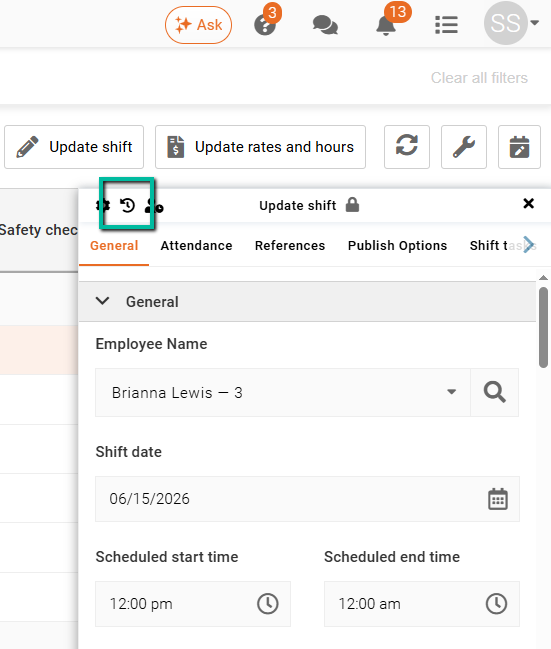
Time Processing → Open the required shift → Click the Shift Changes History (backward-facing arrow) in the top-left corner of the shift panel.
The Shift Audit History opens and displays a chronological record of changes made to the shift.
What Is Recorded?
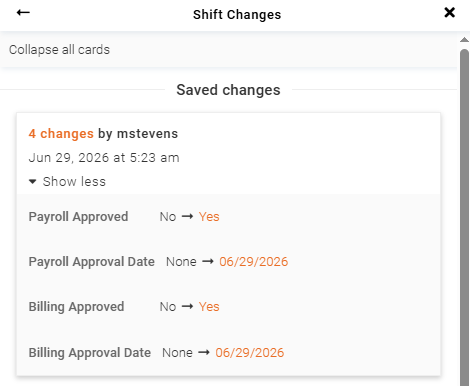
When a shift is approved or unapproved, the following information is recorded in the Shift Audit History:
- Action – Shift Approved or Shift Unapproved.
- User – The user who performed the action.
- Date and Time – When the action occurred.
These entries appear alongside other recorded shift changes, such as assignment updates, time changes, and status changes, giving you a complete history of the shift in one place.
Review Approval Activity
When viewing the Shift Audit History, look for entries labelled Shift Approved or Shift Unapproved.
Each entry includes the username and timestamp, allowing you to confirm who performed the action and exactly when it occurred.
Benefits
Reviewing Shift Audit History can help you:
- Confirm when a shift was approved.
- Identify who approved or unapproved a shift.
- Investigate approval discrepancies.
- Review approval workflows.
- Maintain greater accountability for payroll-related changes.