Manage Meal Breaks
Help employees take their meal breaks on time, record when they start and end, and report any issues at check-out. Use Mid-Shift Reminders to prompt employees, Shift Questions to capture what happened, and Break Guardian to review completed shifts against California meal break rules where applicable.
How Celayix Supports Meal Break Management
Celayix helps employees take meal breaks on time and gives managers the information they need to follow up when a break is missed, late, or shortened.
- Mid-Shift Reminders email employees before a planned meal break. Reminders are timed from the employee’s recorded check-in and can be set at different times for different shift lengths.
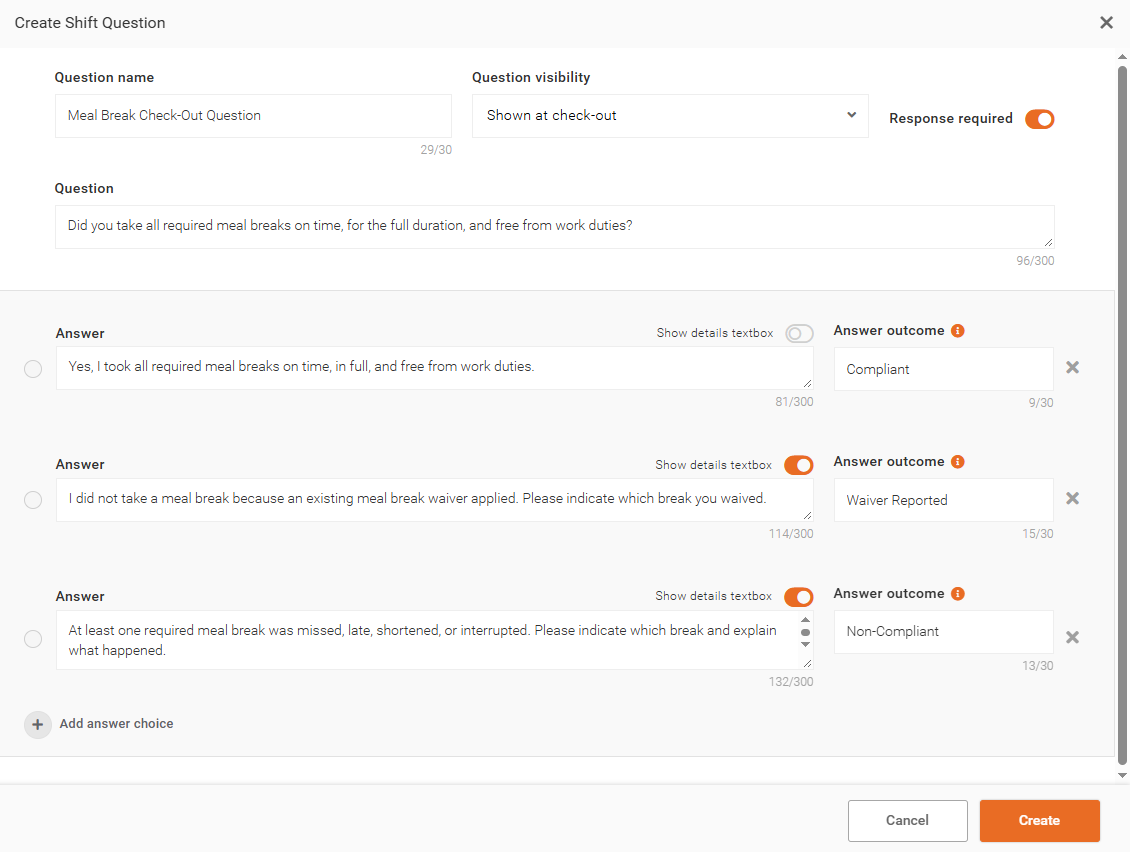
- Shift Questions ask employees at check-out whether they took their required meal breaks on time and in full. Employees can explain what happened, and managers can review their answers in Time Processing.
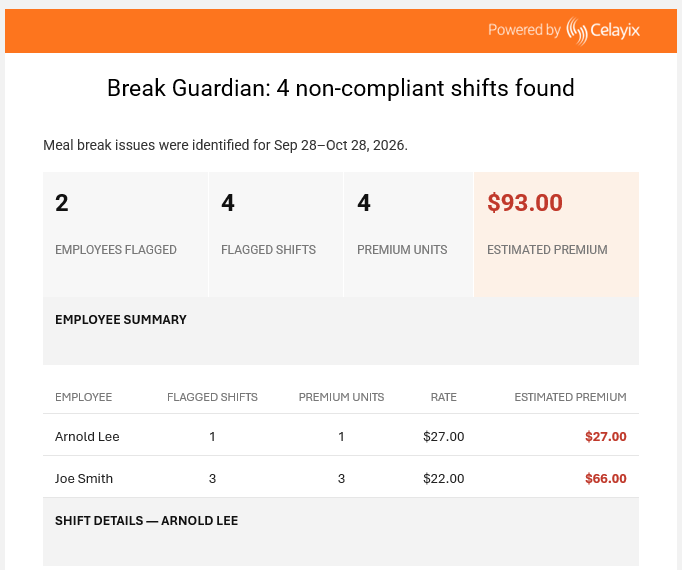
- Break Guardian checks completed shifts against California meal break rules and emails managers a report when it finds missing, late, or shortened breaks.
Example of Meal Break Requirements in California
California’s general meal break rules are one example of how local requirements can inform reminder timing. Each required meal period is generally at least 30 minutes and free from work duties.
| Meal Break | When It’s Generally Required | Latest Start Time |
|---|---|---|
First Meal Break | The employee works more than 5 hours in the workday | By the end of the 5th hour of work |
Second Meal Break | The employee works more than 10 hours in the workday | By the end of the 10th hour of work |
1. Send Reminders Before Planned Meal Breaks
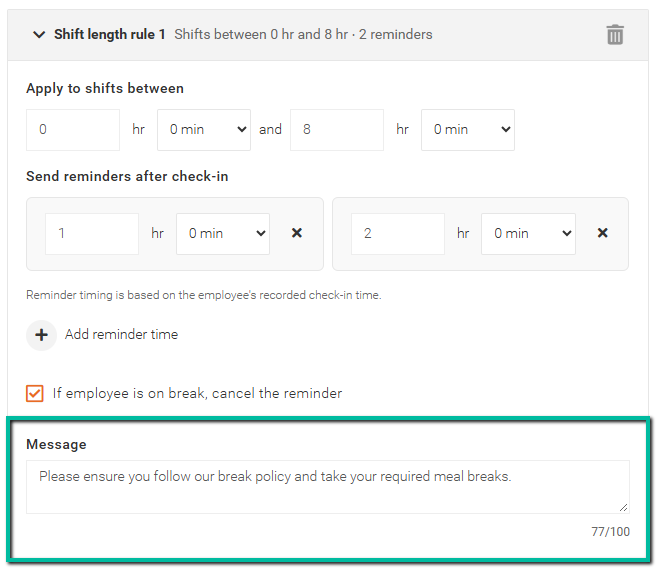
In Schedule Xpress, enable Mid-Shift Reminders for the relevant Employee Access Groups or Sites. Use Shift Length Rules to set when employees receive reminder emails. For longer shifts, add a second reminder where appropriate. Schedule each reminder early enough for employees to arrange coverage or hand off their duties before their planned break.
Example Reminder Schedule for a California Shift
An employee starts work and checks in at 8:00 AM for a shift ending at 8:00 PM. They take their first meal break from 12:00 PM to 12:30 PM and work continuously from the end of that break until their second meal break.
| Meal Break | Reminder Setting | Reminder Email | Planned Break Start | Latest Start in This Example |
|---|---|---|---|---|
First | 3 hours and 30 minutes after check-in | 11:30 AM | 12:00 PM | 1:00 PM |
Second | 9 hours and 30 minutes after check-in | 5:30 PM | 6:00 PM | 6:30 PM |
Reminders run from the employee’s recorded check-in time. California’s deadlines are based on hours worked. In this example, the first 30-minute duty-free meal period puts the end of the tenth hour of work at 6:30 PM.
Example Reminder Message
Please ensure you follow our break policy and take your required meal breaks.
For setup steps, see Enable Mid-Shift Reminders.
2. Have Employees Record Their Meal Breaks
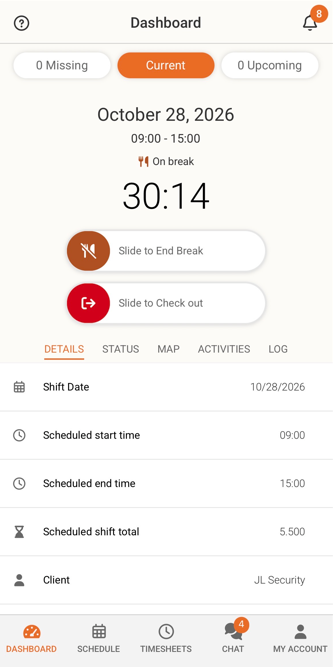
In Team Xpress, employees use Slide to Start Break when they stop working and Slide to End Break when they return. The Break Timer shows how long they’ve been on break.
Ask employees to contact their supervisor as soon as they expect a delay or if they’re called back before their break is over. This gives the supervisor a chance to arrange coverage and follow up on the interrupted break.
Share Slide to Start Break with employees for step-by-step instructions.
3. Ask About Meal Breaks at Check-Out
Set up a Shift Question at check-out so employees can confirm whether they took their required meal breaks on time and in full. Enable the details textbox so employees can explain a delay, interruption, missed break, or recording error.
Example Check-Out Question
Were you able to take each required meal break on time, for the full duration, and free from work duties?
Suggested Answers
- Yes, I took each required meal break on time and in full.
- No, at least one meal break was late, shortened, interrupted, or missed.
- A meal break wasn’t required for this shift.
Admins can review employee answers and details in Time Processing.
For setup steps, see Set Up Shift Questions.
4. Receive and Review Meal Break Exception Reports
For operations subject to California meal break rules, use the Break Guardian workflow to check completed shifts for missing, late, or shortened meal breaks. Choose when the workflow runs, the period it reviews, which sites, services, or employees to include, and who receives the report. When Break Guardian finds exceptions, it emails a report identifying the employees and shifts flagged for review.
Compare the flagged shifts with recorded break times and employee check-out responses. Follow up to understand what happened, address recurring coverage issues, and confirm whether any payroll action is required.
For setup steps, see About Workflows and Create Workflows.