
Enable iCalendar for Employees
iCalendar allows employees to subscribe to their work schedules from calendar applications such as Apple Calendar, Google Calendar, and Microsoft Outlook.
Enable iCalendar
Before employees can access iCalendar, the feature must be enabled for your organization.
Please contact Celayix Support to have iCalendar enabled for your account.
Once enabled, iCalendar access can be managed individually for each employee.
Configure Employee Access
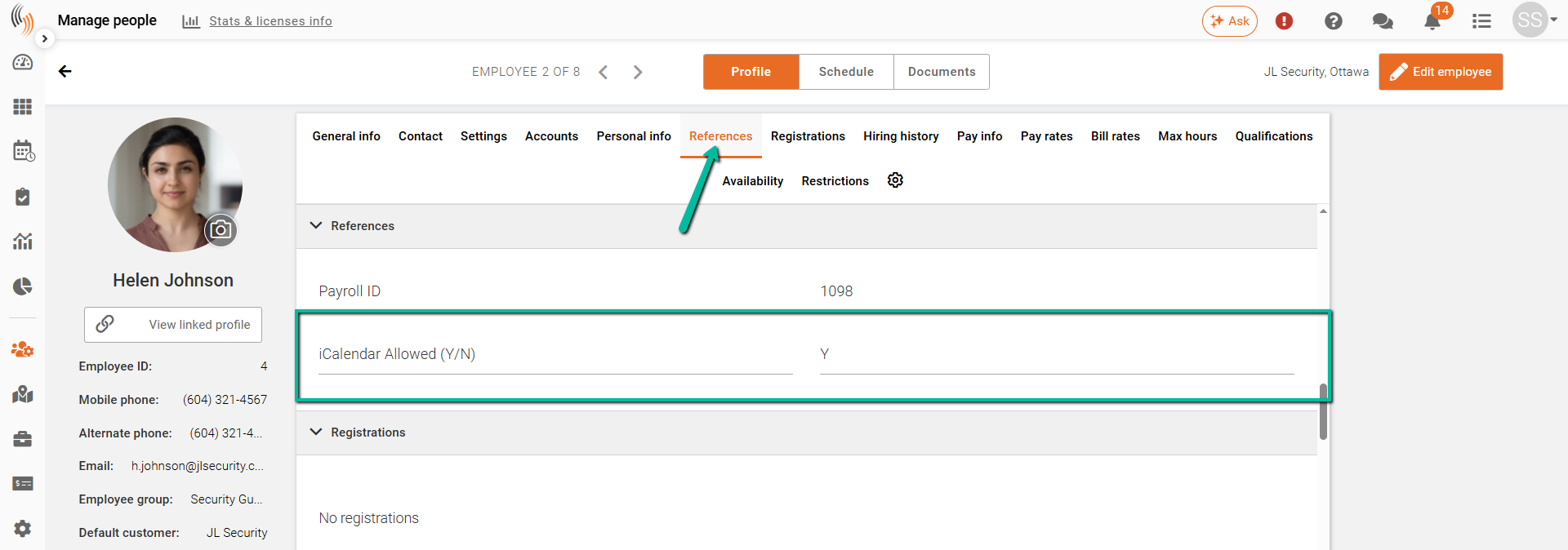
Employee access to iCalendar is controlled through Reference 10 in the employee profile.
Navigate to the employee's profile and locate Reference 10.
Enter one of the following values:
| Value | Result |
|---|---|
Y | Enables iCalendar access for the employee |
N | Disables iCalendar access for the employee |
Save the employee profile after making any changes.
Important Notes
- The iCalendar option is only available after Celayix Support has enabled the feature for your organization.
- Reference 10 must contain either Y or N.
- If Reference 10 is left blank, the iCalendar option will not be available to the employee.
- Employees with Y in Reference 10 will be able to generate and subscribe to their iCalendar link through Team Xpress.
- Employees with N in Reference 10 will not have access to the iCalendar feature.
Next Steps
Once iCalendar access has been enabled, employees can generate their personal iCalendar URL from:
My Account > Preferences > iCalendar
They can then subscribe to their schedule using their preferred calendar application. For instructions, refer to the Sync Schedule to iCalendar article.