
What's New? - June 2026
We are excited to share the latest updates to the Celayix platform, rolled out in June 2026. These updates are designed to improve functionality, enhance user experience, and ensure smoother workflows. Below, you'll find the details of the newest features and improvements.
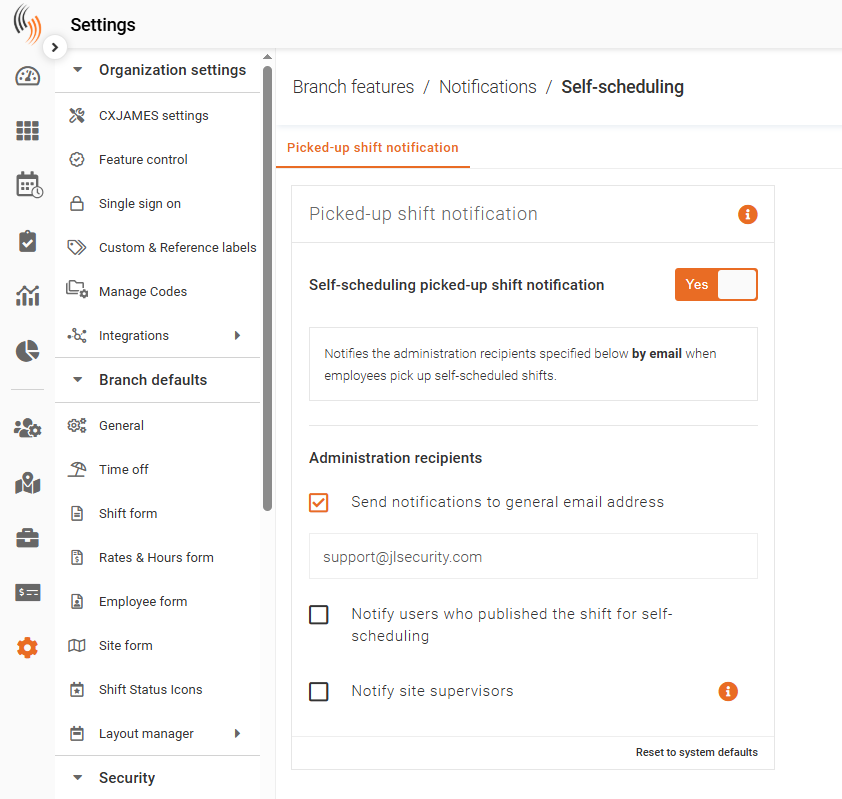
Configure Self-Scheduling Picked-Up Shift Notifications
Use this feature to automatically notify administrators by email whenever an employee picks up a self-scheduled shift. This helps managers stay informed without needing to monitor the schedule manually.
To enable this feature, head to:
Settings → Branch Features → Notifications → Self-Scheduling
Enable Notifications
Turn Self-Scheduling Picked-Up Shift Notification to Yes to activate email notifications when employees successfully pick up self-scheduled shifts.
Choose Notification Recipients
Select one or more of the following recipients:
- Send Notifications to General Email Address – Sends notifications to the email address configured in the text box below.
- Notify Users Who Published the Shift for Self-Scheduling – Sends a notification to the user who originally published the shift.
- Notify Site Supervisors – Sends email notifications to the supervisors listed in the Site Supervisor Notifications Email for the site where the shift was accepted.
You can enable any combination of these options to ensure the appropriate people are notified whenever a self-scheduled shift is filled.
Tip: If multiple recipient options are selected, each selected recipient will receive an email notification when a self-scheduled shift is picked up.
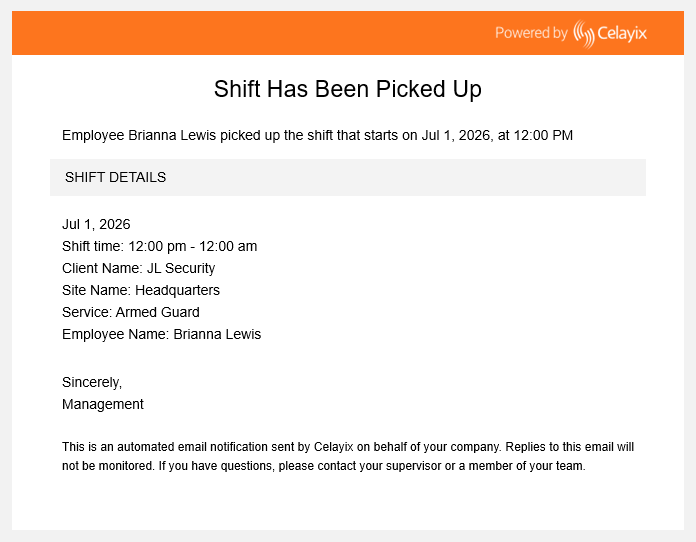
The example below shows a Self-Scheduling picked-up shift notification sent to recipients.
Shift Approval Audit History
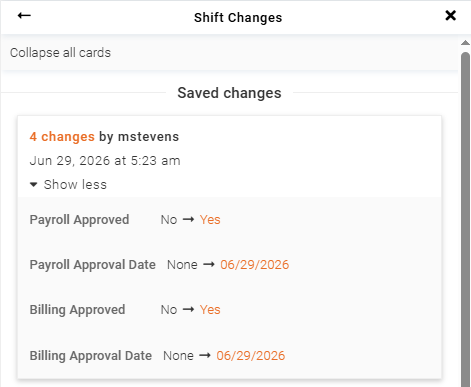
The Shift Log now records when shifts are approved and unapproved, providing a complete history of approval activity.
Each log entry includes:
- Action – Shift Approved or Shift Unapproved.
- User – The user who performed the action.
- Date and Time – When the action occurred.
Approval and approval removal events appear in the Shift Log alongside other shift changes in chronological order, making it easy to review the complete history of a shift.
Kiosk for Web
Kiosk for Web allows employees to check in, check out, and record breaks directly from a supported web browser, eliminating the need to install the Android Kiosk app.
The web version provides the same core kiosk experience while making deployment easier on Windows devices, tablets, and other supported hardware with internet access.
Employees can use their assigned PIN or QR code to perform kiosk actions, and all punches are recorded in the same way as the Apple and Android app versions of the Kiosk.
Use the following URL to access Kiosk for Web:
URL - https://time-kiosk.celayix.com/
Bug Fixes and Improvements
The June 2026 release includes the following bug fixes and improvements across the platform.
Template Hours Retained
Resolved an issue where editing a shift template caused the scheduled shift hours to reset to 0, even when no changes were made.
Shift Templates now retain their configured scheduled hours after being edited and updated, preventing unintended changes.
Template Search Radio Button Selection
Resolved an issue where selecting a shift template after using search caused the screen to jump back to the default selection.
Radio button selections now apply correctly after searching, without requiring the user to select the template a second time.